




Feature tour

Learner's test app features

A closer look at Learners Test Canada: practice tests in your province's format, explained answers, a daily plan, road signs, progress by part, and your privacy choices.

Last updated:

Your province's test, as a ticket

When you first open the app, you pick where you will take your test. The app then sets up that test's practice format: its parts, the number of questions, the pass mark for each part, and any time limit.

  • Alberta's has 30 questions and needs 25 correct; the practice ends as soon as you reach 25.
  • British Columbia's has 50 questions in 45 minutes, and you can skip each question once.
  • New Brunswick's sign part includes the three signs you must not miss.
  • Where an official count isn't published, the app uses 20 questions per part and says the count is to be confirmed.

Timed tests can also be practised with double time or no timer. Progress is kept separately for each province. Compare the tests by province.

Ontario · practice test in the app

G1 knowledge test

2 partsNo time limit
  • Road signs20 questions · 16 to pass (80%) to be confirmed
  • Rules of the road20 questions · 16 to pass (80%) to be confirmed

The Ontario practice test in the app. Figures marked to be confirmed are practice settings, not official figures.

Every wrong answer, explained first

After you check an answer, a sheet slides up. If you missed, it tells you why your choice was wrong before anything else, then why the right answer is right, and the handbook section the rule comes from. You can open the reasons for the other wrong choices too.

Before you check, tap how sure you were: guessed, unsure or I know this. A lucky guess still comes back for review.

Illustration of an Ontario practice question in the app. After you answer, a sheet explains why your choice was wrong, why the right answer is right, and where the rule comes from in the handbook.

A route, not a pile of questions

The home screen shows your route to the test: signs, rules, the practice test, then test-ready. Today's plan puts your reviews first, then new questions, and picks up where you left off.

Practise by topic, by road-sign family, or go straight to your mistakes and saved questions.

Illustration with sample data: the home screen shows your route to the test and today's plan.

Progress part by part

Where your province scores each part on its own, so does the app. Progress rings show each part against its target, and practice test results show your score in each part against its pass line.

Practice results are never official results, and the app never shows your chances of passing as a percentage.

Illustration with sample data: progress for each part, and a practice test result scored part by part against its pass line.

Road signs, drawn for the app

Signs are grouped by family, the way you learn them: regulatory, warning, construction, information, school and pedestrian signs, and signals. Every sign is original artwork drawn from a written description, not copied from an official image.

Red eight-sided sign with the white word STOP.
Regulatory
Yellow diamond with a black arrow curving to the right.
Warning
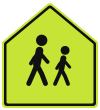
Bright yellow-green five-sided sign, pointed at the top, with black silhouettes of two children walking.
School
Yellow diamond with a black silhouette of a moose.
Wildlife
Upside-down triangle, white, with a wide red border and no text.
Right-of-way
White X-shaped sign with red edges.
Railway

Also included

English and French

Switch language at any time. Québec's questions are written in French first.

Offline

All questions, explanations and sources are in the app.

Dark mode and large text

The same night-road look after dark, and screens that adapt to larger text.

Automatic backup

An account is optional. Sign in with email or Google, and your progress for every province backs up automatically. Guests keep everything on the phone.

Your privacy choices

“Help improve the app” is a box you can tick or untick at setup, and change anytime in Profile. Privacy policy.

Report a problem

Think a question is wrong? Report it from the explanation; we check it against the handbook.

Achievements

Each province and territory has its own achievements, and each one is earned by using a real feature: practising every topic, fixing mistakes, finishing a full practice test.

Your data on this device

Export your study data as a JSON file, or erase local progress, from Profile.

Rate and share

Rate the app or share it with friends who are getting their learner's licence, from Profile.

Free and lifetime access

Free

Free to practise

  • Every practice question, with explanations and sources: unlimited
  • Short study quizzes, by topic and by sign family: unlimited
  • Reviews of your mistakes and a daily plan
  • One full practice test a day, shared across all provinces and territories
  • Watch an optional short video to unlock one more that day
  • English and French, offline

The free version shows a small banner ad on result screens. Ads are never personalised.

Lifetime access · at launch

CA$5.99 once

  • Unlimited full province practice tests
  • No ads
  • Detailed progress
  • One-time purchase through Google Play. No subscription, no renewal.
  • No app account needed to buy it

The free full practice test resets at midnight, your local time. Ads appear only for free users: a small banner on practice and exam result screens, and a rewarded video only when you choose one. They come from Unity Ads, or Google AdMob when Unity has no ad, and are never personalised. Lifetime access is sold through Google Play at launch and removes all ads.

Coming soon to Android

The app isn't on Google Play yet. This page will link to it when it is.

Android app. It is not on Google Play yet; the link will appear here when it is.